AI assistant for product teams: what it should do, and how to test one in ten minutes.
Four different products are sold as an "AI assistant for product teams". Here is what the phrase should mean, five tests you can run before you buy, and where Wisibl lands on each.
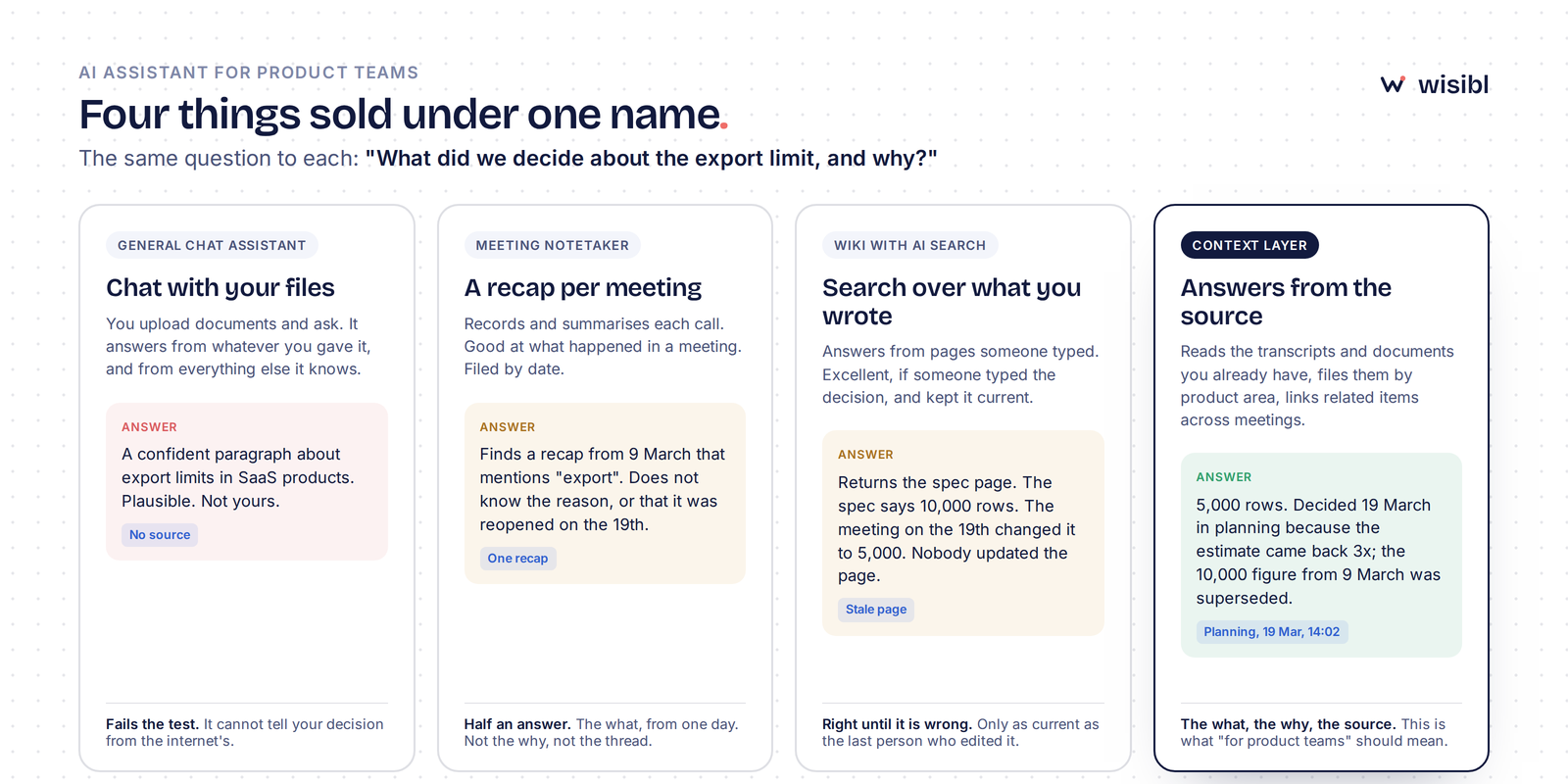
An AI assistant for product teams should answer the questions product teams actually get asked, "what did we decide, why, and what are customers asking for", from your team's own conversations and documents, with the source attached, and it should say "I don't know" when it has no source. Four different kinds of product are sold under this name. Only one does that. You can tell them apart in ten minutes with the five tests below, and you can run them on Wisibl for free with a single meeting.
- "AI assistant for product teams" is used for four different things: a chat assistant with your files, a meeting notetaker, a wiki with AI search, and a context layer that sits on top of your existing tools.
- The test that separates them is one question: "What did we decide about X, and why?" Three of the four cannot answer it with a source.
- Five things to check before you buy: filed by product area, source on every answer, declines when it does not know, links decisions across meetings, works from what you already have.
- Run the tests with one real transcript, not a demo. If the answers do not come with sources, stop.
What an AI assistant for product teams should do
Start with the questions, because the questions are the job. Sales asks "do we support this, is it on the roadmap?" Support asks "was this fixed, what do I tell the customer?" Engineering asks "what did we decide about that, and why?" Leadership asks "what are customers asking for most?" Every one of those has an answer somewhere in your team's meetings and documents. None of them is easy to find, so they get asked of a person, and that person becomes the team's human FAQ.
An AI assistant for product teams exists to answer those questions instead of that person. Which means it has to do four things a general assistant does not: know your product's context rather than the internet's, keep that context organised by the parts of your product rather than by date, show the source for every answer, and refuse to guess when it has no source. Everything else is detail.
The four things sold under one name
A general chat assistant with your files. You upload documents and ask questions. It is quick, and it is useful for drafting. The problem is that it answers from your files and from everything else it has ever read, and it cannot tell you which is which. Ask what you decided about the export limit and you get a confident paragraph about export limits in SaaS products. Plausible, fluent, and not yours.
A meeting notetaker with AI summaries. It records each call and writes a recap. Good at what happened in one meeting. Filed by date. Ask about the export limit and it finds the recap from 9 March that mentions "export", but not the reason, and not that the number was changed on the 19th. The what, from one day. Not the why, not the thread.
A wiki with AI search. It answers from pages someone typed. Excellent, as long as someone typed the decision and kept the page current. Ask about the export limit and it returns the spec, which says 10,000 rows. The meeting on the 19th changed it to 5,000. Nobody updated the page. It is right until it is wrong, and it cannot tell you which.
A context layer. It reads the transcripts and documents your team already produces, files what it finds under the part of the product it concerns, links related items across meetings, and answers with the source. Ask about the export limit and you get: 5,000 rows, decided 19 March in planning because the estimate came back 3x, the 10,000 figure from 9 March was superseded. Planning, 19 March, 14:02. That is what "for product teams" should mean.
Five tests to run before you buy
Each of these takes two minutes with one real transcript. Do not use the vendor's demo data; use a meeting your team actually had, where you know what was said.
1. Is it filed by product area, not by date?
Add the transcript and look at where things landed. If you see a document called "Standup, 9 March", it is a notetaker. If you see "Onboarding: 3 decisions, 1 open question" and "Billing: 2 requests", it is organised the way questions arrive. Nobody asks "what happened on 9 March". They ask about billing.
2. Does every answer carry its source?
Ask "what did we decide about [something from the meeting]?" The answer should come with the meeting, the moment, and ideally the person, and clicking the source should take you to the exact line in the transcript. An answer without a source is an opinion with good formatting. For a decision, that is worse than no answer, because someone will act on it.
3. Does it say "I don't know"?
Ask something the transcript does not cover. "What did we decide about pricing in Europe?" If the assistant produces a confident answer, it is drawing on general knowledge, and it will do the same when the stakes are real. The right response is "I have no source for that", with nothing invented. This is the test most tools fail, and it is the one that matters most.
4. Does it link decisions across meetings?
Add a second transcript where the same topic comes up again. Ask the question again. The answer should show both moments and which one is current: raised on the 9th, changed on the 19th. A tool that treats each meeting as a separate document gives you two answers and leaves the joining to you, which is the job you were trying to stop doing.
5. Does it work from what you already have?
Count how much you had to write. If the setup was "connect your notetaker, add a transcript, ask a question", it works from what exists. If it was "create your pages, write your definitions, tag your entries", you have bought a wiki with a chat box, and the wiki's problem, that someone has to keep it current, has not gone anywhere.
Ready to test it.
Add one transcript, ask three questions, check the sources. Free plan, no credit card, about ten minutes.
Hire WisiblQuestions to ask any vendor
Four short ones, and the answers should be short too.
- Is our data used to train models? The answer should be no, in writing.
- Can we export everything and delete everything? Yes, and it should be self-serve.
- Is it single-user or a team workspace today? Ask precisely; "coming soon" is not "today".
- Which sources connect today, and which are on the roadmap? Ask the same way.
Wisibl's answers, for the record: no; yes, both; single-user today, team workspaces next; Fireflies and transcript upload plus documents, spreadsheets and diagrams today, Slack and email next.
What it will not do
An honest assistant will not remove the ambiguity from product work. Three users will still want three things, the estimate will still come back high, the stakeholder will still escalate. What it removes is the second time round: the decision re-made because the first one was not kept, the metric argued about after it was defined, the request that was mentioned in three calls and never counted.
It also will not write your recaps or your PRD. Keep the notetaker for the first, and keep the human for the second.
How Wisibl does on the five tests
- Filed by product area: yes. Every transcript and document is read, classified as internal or customer-facing, and its decisions, open questions, risks and customer requests are filed under the part of the product they concern.
- Source on every answer: yes. Each answer opens the meeting and the moment it came from, without leaving the conversation.
- Says "I don't know": yes, by design. If there is no source in your workspace, Wisibl declines rather than answering from general knowledge.
- Links across meetings: yes. A question raised in one meeting and answered in another shows as one thread, and every entry keeps a history trail.
- Works from what you have: yes. Fireflies transcripts and uploads today; documents, spreadsheets and diagrams too. Nobody writes a wiki.
What it is not, today: a team workspace. One product manager, one workspace, until shared workspaces ship. If you need five people in it this week, we would rather tell you now.
Try it with one meeting
The whole evaluation is ten minutes and does not need a card. Sign in, add one transcript or document, ask three questions you already know the answers to, and check the sources. If the answers come with the source and the fourth question gets an honest "I don't know", you have found the kind of assistant this post is about.
Questions people ask
Is an AI assistant for product teams different from ChatGPT with my documents uploaded?
Does it replace our meeting notetaker?
How long does it take to get something useful?
What happens to our transcripts and documents?
Run the five tests on your own meeting.
Add one transcript, ask three questions, check the sources. Free plan, no credit card, about ten minutes.
Hire WisiblLast updated . We revisit posts when the product or the advice changes.