Meeting notes tools vs product knowledge platforms: which one does your team need?.
Meeting notes tools record what happened in a meeting. Product knowledge platforms keep what is true about the product. Here is the difference, when you need each, and why most teams end up with both.
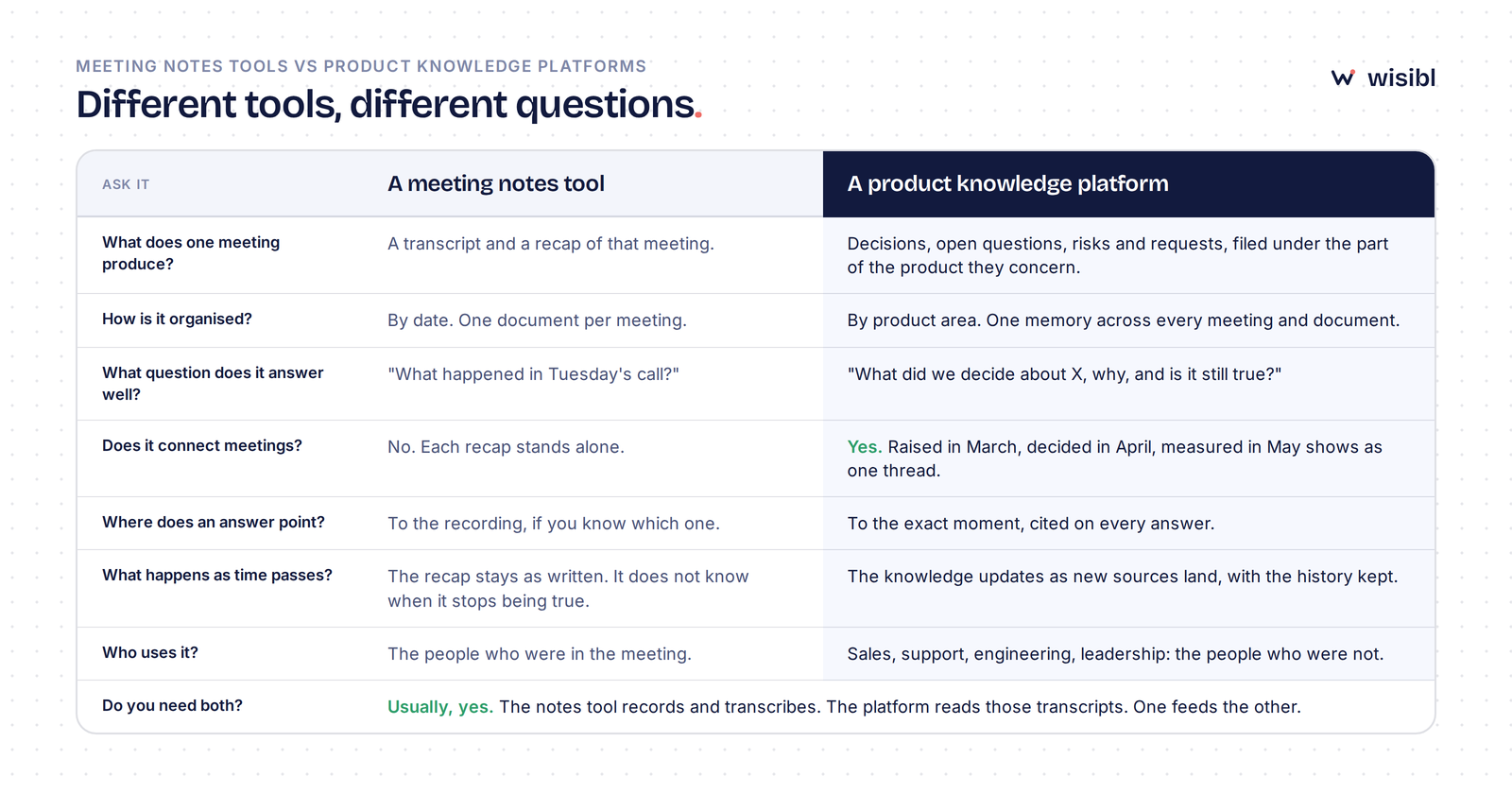
A meeting notes tool records a meeting and gives you a transcript and a recap of it, filed by date. A product knowledge platform reads those transcripts, and your documents, and keeps what is true about the product: the decisions, the open questions, the customer requests, organised by the part of the product they concern and traceable to the moment they were said. If the question is "what happened in Tuesday's call?", you want the first. If the question is "what did we decide about X, why, and is it still true?", you want the second. Most product teams end up with both, because one feeds the other.
- They are different products with different units: a notes tool produces one document per meeting; a knowledge platform produces one memory across all of them.
- Notes tools are organised by date and used by the people who were in the room. Knowledge platforms are organised by product area and used by the people who were not.
- The test that separates them is one question: "what did we decide about X, and why?" A notes tool finds a recap; a platform gives the answer with the source.
- You do not choose between them. The notes tool records; the platform reads what it recorded.
What a meeting notes tool does
A meeting notes tool joins your calls, records them, transcribes them, and writes a recap: attendees, key points, action items. Fireflies, Otter, Fathom and tl;dv all do a version of this, and they do it well. Nobody types while pretending to listen any more. Everyone who was in the meeting gets the same record of it, and anyone who missed it can catch up in three minutes.
What it produces is a document, one per meeting, filed by the date the meeting happened. That is the right shape for the question it was built to answer: what happened in this meeting?
What a product knowledge platform does
A product knowledge platform starts where the recap ends. It reads the transcript, and the documents your team already has, and pulls out the things a product team needs to keep: the decision and the reason for it, the question that was raised and not answered, the request a customer made, the risk someone flagged. It files each under the part of the product it concerns, links it to earlier and later mentions across other meetings, and keeps a pointer to the exact moment it was said.
Then it answers questions. Not "what happened on 19 March", but "what did we decide about the export limit, and why?" The answer is a sentence, with the source attached, and if there is no source in the team's records, a good platform says so rather than guessing.
That is the right shape for a different question: what is true about the product right now?
The difference, side by side
The row that matters most is the fourth one. A notes tool cannot connect meetings, because it has no reason to; each recap is complete on its own. A question raised on 4 March and answered on 19 March will say "open" in the 4 March recap forever, because nobody edits recaps. A knowledge platform treats the question as one thing that moved from open to answered, and shows both moments.
The row people underestimate is the last but one. Recaps go to the attendees. The people who actually ask product questions, sales, support, engineering, leadership, were not in the meeting, and they are not going to read six recaps to find out whether a feature exists. They ask the product manager. The platform is what answers them instead.
When a notes tool is enough
Honestly: for a while. If the team is three people, everyone is in every meeting, and the product is small enough to hold in one head, a notes tool with a disciplined recap habit covers it. The gap opens when any of those stop being true: someone joins who was not in the room, the product grows past one person's memory, or the questions start coming from people who do not attend the meetings. At that point the recaps are still accurate; they are just not findable, and the product manager becomes the search engine.
When you need a knowledge platform
The signals are consistent across teams:
- The same question gets asked more than once, by different people, weeks apart.
- A decision gets re-litigated because nobody can find why it was made.
- A new product manager spends their first month reconstructing history from recordings.
- A customer request is mentioned in three separate calls and never counted, so it never makes the list.
- The answer to "do we support this?" is "let me check", and the check takes twenty minutes.
Each of those is a symptom of knowledge that exists in recaps and cannot be reached. A notes tool cannot fix them by recording more meetings. That is what the platform is for.
Using both, which is what most teams do
The clean setup is simple. The notes tool records and transcribes, as it already does. The platform connects to it and reads every transcript as it lands, plus the specs, sheets and diagrams the team keeps. Nobody changes how they run meetings, and nobody writes a wiki. The recap still goes to the attendees. The knowledge goes to everyone.
If you are evaluating a platform, the check is the same one from our buyer's guide: add one real transcript, ask three questions you know the answer to, and see whether the answers come with their sources. Then ask one it cannot know, and see whether it admits that.
Where Wisibl fits
Wisibl is the second kind. It connects to Fireflies, accepts transcripts and documents from anywhere else, classifies each meeting as internal or customer-facing, files what it finds by product area, links related items across meetings, and answers questions with the source attached. It declines when it has no source. It is single-user today, with team workspaces next, and there is a free plan that needs no card. It does not record meetings and does not intend to; keep your notes tool for that.
Questions people ask
Is a product knowledge platform just a notes tool with a search box?
Can a meeting notes tool do this if I write good summaries?
Which meeting notes tool works with Wisibl?
Do I need to replace Notion or Confluence too?
Find out what your recaps have been holding.
Connect Fireflies or add one transcript, ask three questions, check the sources. About ten minutes, no card.
Hire WisiblLast updated . We revisit posts when the product or the advice changes.